
Motion blur
| Creating
more speed sensation using motion blur. |
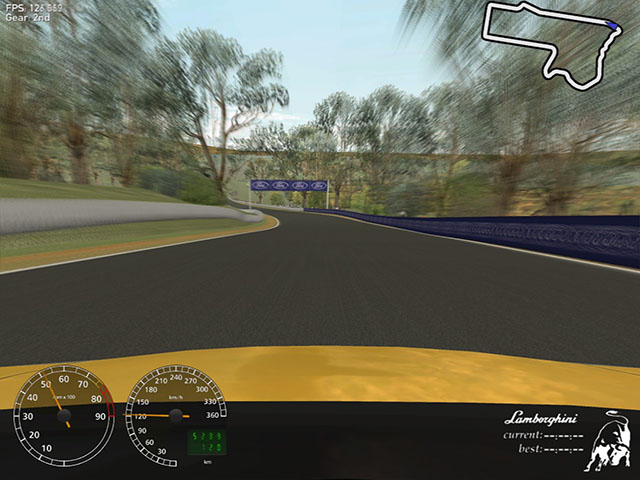
|
Racer has multiple motion blurring options; car wheels
can have multiple blurred models, and fullscreen motion blurring exists since
v0.5.3 beta 6. Notice that wheel blurring comes relatively for free if you use
full-screen motion blur, although currently the wheel blurring itself can look
better.
For extremely fast machines, you can try the accumulation buffer
technique. It seems even with high-end cards the accumulation buffers are too
slow though.
- set racer.ini's renderer.motion_blur.method to 1
- set renderer.motion_blur.passes to something like 5 (this
is the number of frames rendered before anything is drawn, so expect your
framerate to at least drop by 5 in this caes).
- set renderer.motion_blur.accum_factor to something near 1.
Values below 1 aren't really interesting, but values above 1.0 give added
brightness, which may be nice for effect.
A faster method is #2, which uses a blurring texture.
- set racer.ini's renderer.motion_blur.method to 2
- set renderer.motion_blur.blur_alpha to something like 0.7
or 0.8. This is the amount of blur; higher values give more blur, but 0.95
for example really makes you dizzy.
The best method though currently (16-7-08)
is to use FBO's. This requires a reasonable up-to-date graphics card though
(nVidia 7950 for example). See also the
page on fullscreen shaders for more information on motion blur.
- set racer.ini's renderer.motion_blur.method
to 4
- set renderer.motion_blur.blur_alpha to something
like 0.5. This is the amount of mixing between the new frame and the old frame
(in the framebuffer). Higher values (towards 1) mean more blur, although too
much just probably gives more headaches.
- empty renderer.motion_blur.fs_filter1/fs_filter2
(last
updated
June 5, 2011
)